
The "Salary List" feature in HRMex Time and Attendance software, accessible from the Payroll menu, is a valuable tool for reviewing and exporting employee salary information. This feature allows users to select the month for which they want to view salaries, apply filters for specific employees, and export salary data in various formats.
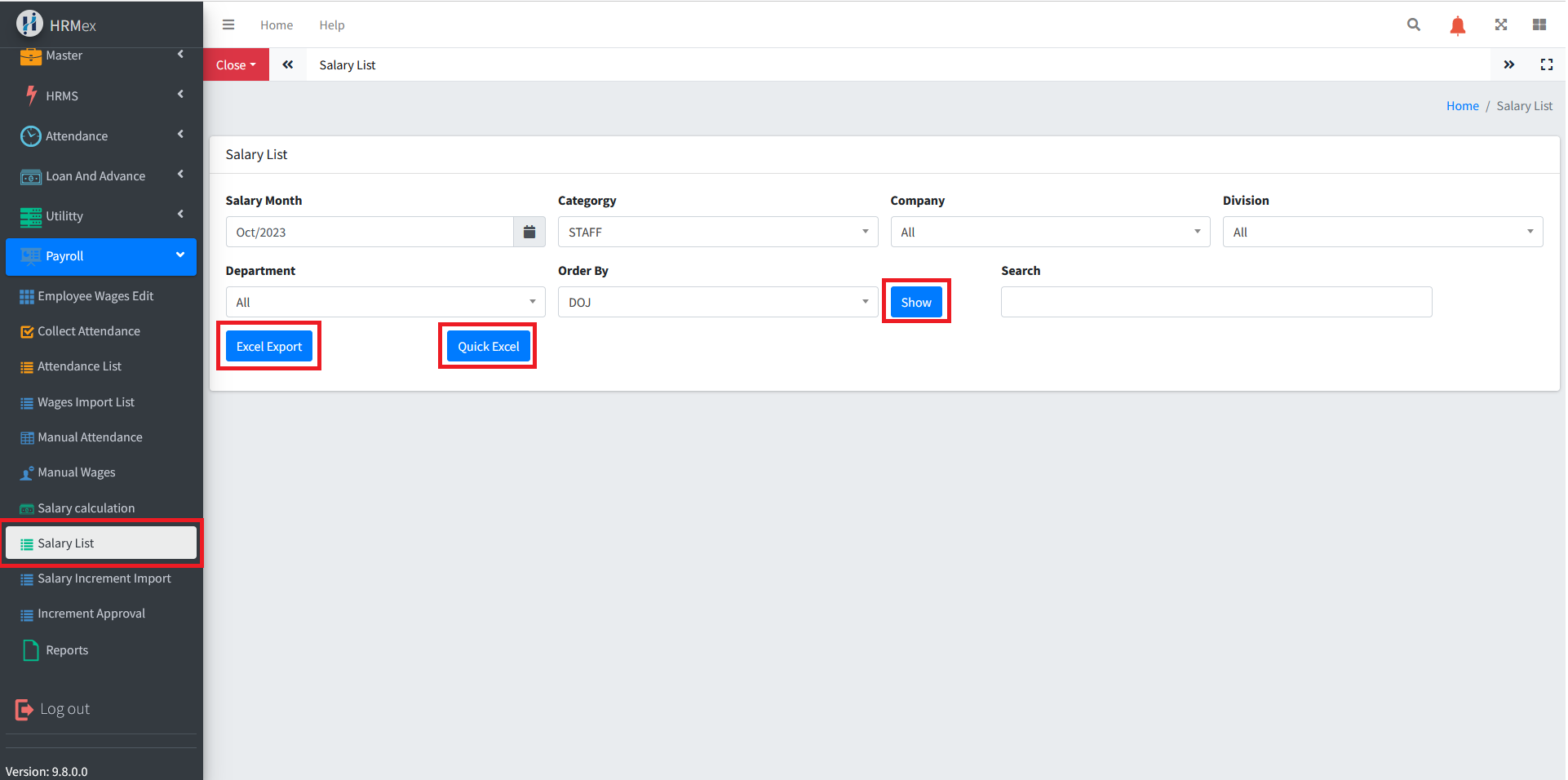
Accessing Salary List
- Log in: Start by logging into the HRMex Time and Attendance software using your credentials.
- Navigate to Payroll Menu: In the main menu, click on the "Payroll Menu" option.
- Access Salary List: Within the Payroll Menu, locate and select the "Salary List" option. This opens the Salary List interface.
Viewing Salary Data
The Salary List interface provides tools for viewing salary information. Here's how to use this feature:
Select the Month: Begin by choosing the specific month for which you want to view salary data. This ensures that the software focuses on the chosen time frame.
Apply Filters: If needed, you can filter the list of employees based on their category, company, division, or department.
Order Data: You can also choose the order in which the data is displayed, such as sorting by employee code, company, and more.
Click "Show": After selecting the month and applying filters, click the "Show" button to display the salary information for the filtered employees.
Search for Specific Employee: Use the search bar to search for a specific employee's salary by entering their name, ID, or other identifying information.
Exporting Salary Data
To export salary data, you have two options:
Click "Excel Export": Use the "Excel Export" button to export the displayed salary data into an Excel spreadsheet with proper formatting. This is suitable for detailed record-keeping and reporting.
Click "Quick Excel": The "Quick Excel" button allows you to export the presented salary data as it is, quickly saving it to an Excel sheet in seconds.
Benefits of Salary List
- Efficiency: Quickly access and review salary data for a specific month without manual entry.
- Customization: Apply filters to focus on specific groups of employees.
- Search Functionality: Find specific employees' salary data using the search bar.
- Data Export: Easily export salary data for reporting and analysis.
The "Salary List" feature in HRMex Time and Attendance software streamlines the process of viewing and exporting salary data, enhancing your ability to manage employee compensation efficiently.