
HRMex Time Attendance Software includes a comprehensive feature for managing Compensatory OFF (COFF). This feature allows HR administrators to track and manage employee entitlements and utilization of COFF. Users can access the COFF section from the Attendance Navigation menu. Here, you can find details about employees' Weekly Off Present (WOP), Holiday Present (HP), Extra Work Present (EWP), and generate COFF based on specified criteria.
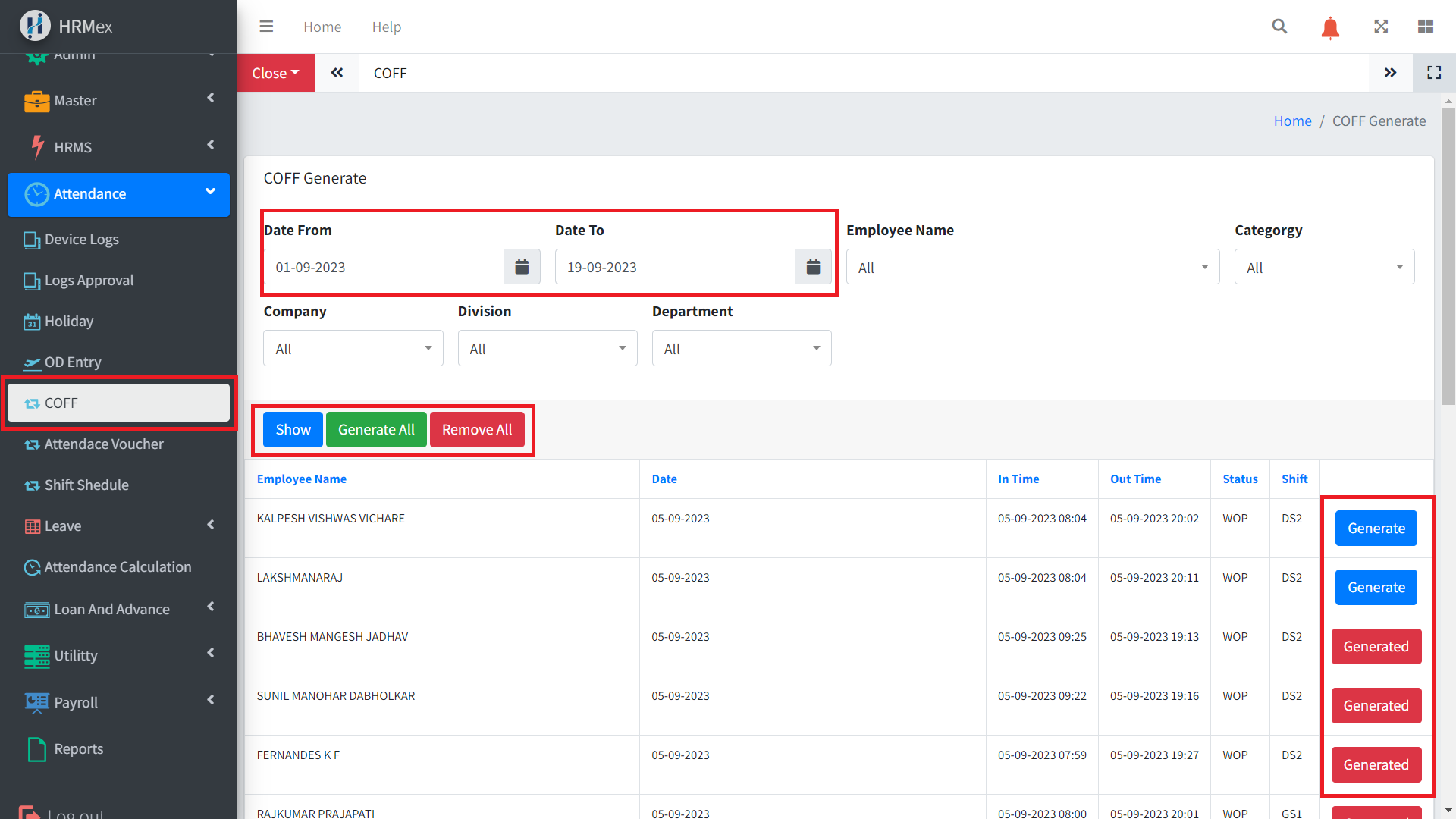
Accessing the COFF Section
- Log in to HRMex: Begin by logging in to the HRMex Time Attendance Software using your credentials.
- Navigate to COFF: Access the COFF feature from the Attendance Navigation menu.
COFF Calculation Criteria
Before generating COFF, the system applies specific criteria:
- Weekly Off Present (WOP): The system tracks employees who have worked on their scheduled weekly off days.
- Holiday Present (HP): The system identifies employees who have worked on company-declared holidays.
- Extra Work Present (EWP): To be eligible for COFF, an employee's extra work should meet or exceed the shift's absent minutes for a half-day COFF or the half-day minutes for a full-day COFF.
- Generate COFF: After specifying employee and date details, click the "Generate" button to create COFF for an individual or a group of employees.
Managing COFF
In the COFF section, you can perform the following actions:
- Generate COFF: Click the "Generate" button to generate COFF for specified employees and dates. Individual and bulk-generation options are available.
- Delete Generated COFF: If needed, you can delete COFF entries that were previously generated but are no longer relevant or accurate.
- Generate All COFF: This option allows you to generate COFF for all eligible employees with a single click. Useful for streamlining the COFF generation process.
- Remove All COFF: If necessary, you can remove all previously generated COFF entries in one action.
Tracking COFF Balance
To keep track of employees' COFF balances, you can access the Leave Statement in the Leave Navigation menu. Here, you can view detailed information about each employee's COFF entitlement, utilization, and the remaining COFF balance.
Benefits of COFF Management
The COFF Management feature in HRMex Time Attendance Software offers several benefits:
- Efficiency: Streamlines the process of tracking, generating, and managing COFF, reducing administrative overhead.
- Accuracy: Ensures that COFF is calculated based on predefined criteria, promoting fairness and consistency.
- Transparency: Allows HR administrators to easily track COFF balances for individual employees, aiding in decision-making.
- Compliance: Helps organizations comply with labor laws and regulations regarding compensatory time off.
Conclusion
The COFF Management feature in HRMex Time Attendance Software simplifies the management of Compensatory OFF for employees. By tracking WOP, HP, and EWP, the system ensures that COFF is generated fairly. Administrators can easily generate, delete, or track COFF entries, promoting efficiency and accuracy in attendance management. This feature also facilitates compliance with labor regulations and provides transparency to both employees and HR administrators.