
The "Loan Manage" feature in HRMex Time and Attendance software, accessible from the "Loan and Advance" menu, is a valuable tool for managing and keeping records of loans taken by employees. This feature enables users to add new loans, view existing loan records, and export loan data for further work or record-keeping.
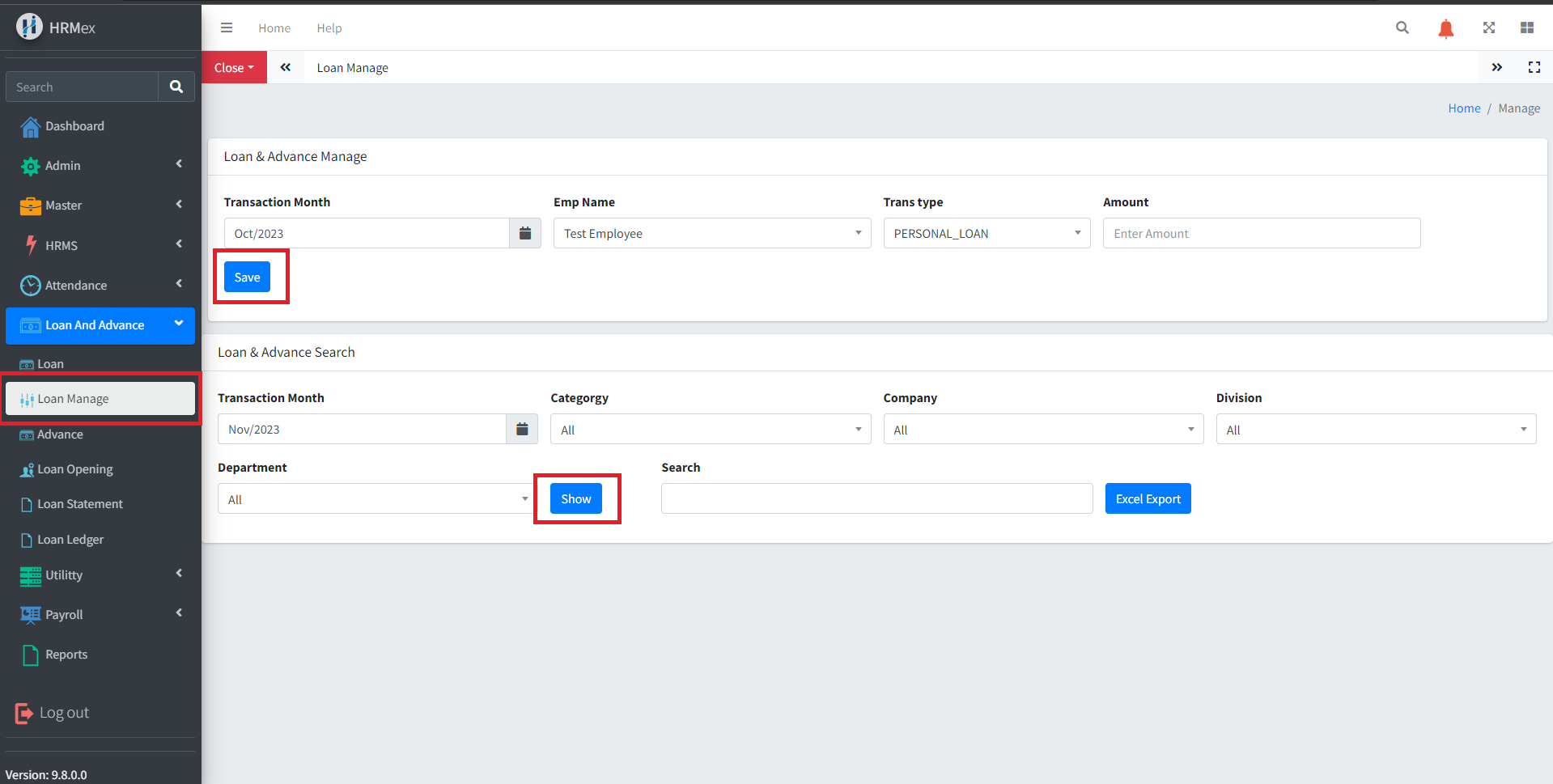
Accessing Loan Manage
- Log in: Start by logging into the HRMex Time and Attendance software using your credentials.
- Navigate to Loan and Advance Menu: In the main menu, click on the "Loan and Advance" menu option.
- Access Loan Manage: Within the Loan and Advance menu, locate and select the "Loan Manage" option. This opens the Loan Manage interface.
Adding New Loans
The Loan Manage interface provides the tools for adding new loans to employee records. Here's how to use this feature:
Select the Transaction Month: Start by choosing the specific month for which you want to add a new loan.
Choose Employee Name: Select the name of the employee for whom you're adding the loan.
Select Loan Type: Choose the type of loan from the options available.
Enter Loan Amount: Input the loan amount for the selected employee.
Save Loan: After entering the loan details, click the "Save" button to create a new loan record.
Viewing Existing Loan Records
To view existing loan records, follow these steps:
Apply Filters: In the Loan and Advance Search section on the same page, select the transaction month and apply filters based on employee category, company, division, or department.
Click "Show": After applying the filters, click the "Show" button to view the loan records that match the selected criteria.
Exporting Loan Data
To export loan data for further work or record-keeping:
- Click "Excel Export": Use the "Excel Export" button to export all the presented loan data into an Excel spreadsheet. This facilitates additional analysis and reporting.
Benefits of Loan Manage
- Efficiency: Easily add new loans to employee records and view existing loan records within one module.
- Customization: Apply filters to focus on specific groups of loan records.
- Data Export: Export loan data for further work or records, enhancing administrative and reporting capabilities.
The "Loan Manage" feature in HRMex Time and Attendance software simplifies the process of managing employee loans, ensuring data accuracy and efficiency in loan tracking and administration.