
The "Increment Approval" feature in HRMex Time and Attendance software, accessible from the Payroll menu, is a vital tool for approving salary increment requests made by employees. This feature allows users to select the request month, apply filters, review increment requests, and approve them with a simple click.
Accessing Increment Approval
- Log in: Begin by logging into the HRMex Time and Attendance software using your credentials.
- Navigate to Payroll Menu: In the main menu, click on the "Payroll Menu" option.
- Access Increment Approval: Within the Payroll Menu, locate and select the "Increment Approval" option. This opens the Increment Approval interface.
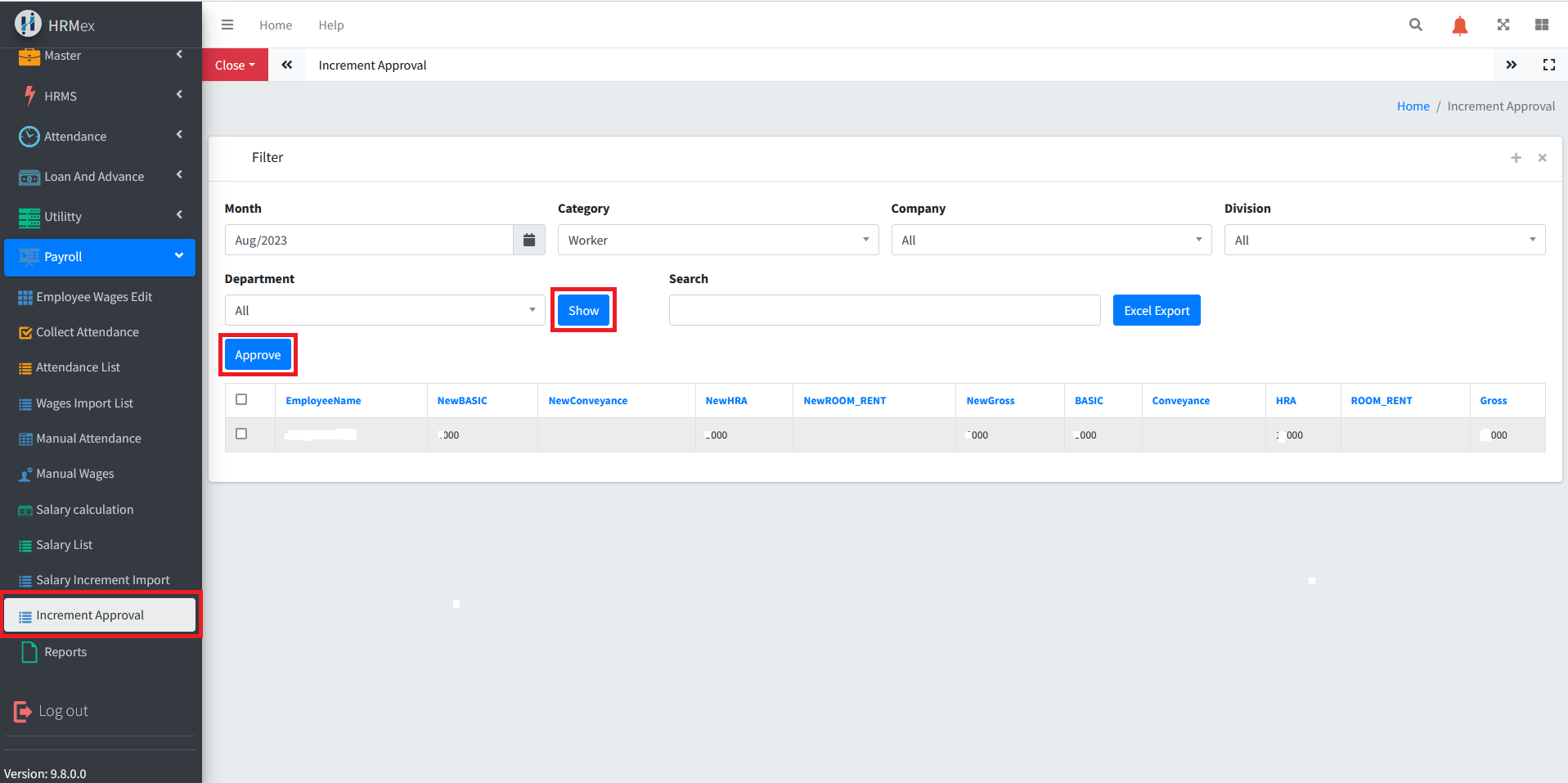
Approving Salary Increment Requests
The Increment Approval interface provides the tools necessary for approving salary increment requests. Here's how to use this feature:
Select the Request Month: Start by choosing the specific month for which you want to approve salary increment requests.
Apply Filters: If needed, you can filter the list of employees' requests based on their company, category, division, or department. This allows you to focus on specific groups of requests.
Click "Show": After selecting the request month and applying filters, click the "Show" button to display the increment requests. The requests will include the present value and the requested increment value.
Review Increment Requests: Each request will have a checkbox next to the employee's name. You can select the checkboxes for the employees whose increment requests you want to approve.
Click "Approve": After selecting the desired requests, click the "Approve" button. This action will approve the increment for the selected employees.
Benefits of Increment Approval
- Efficiency: Quickly review and approve increment requests for a specific month and specific groups of employees.
- Customization: Apply filters to focus on specific groups of increment requests.
- Error Prevention: Ensure that increments are approved correctly, enhancing data accuracy.
The "Increment Approval" feature in HRMex Time and Attendance software streamlines the process of reviewing and approving salary increment requests, ensuring efficiency and accuracy in handling employee salary increments.