
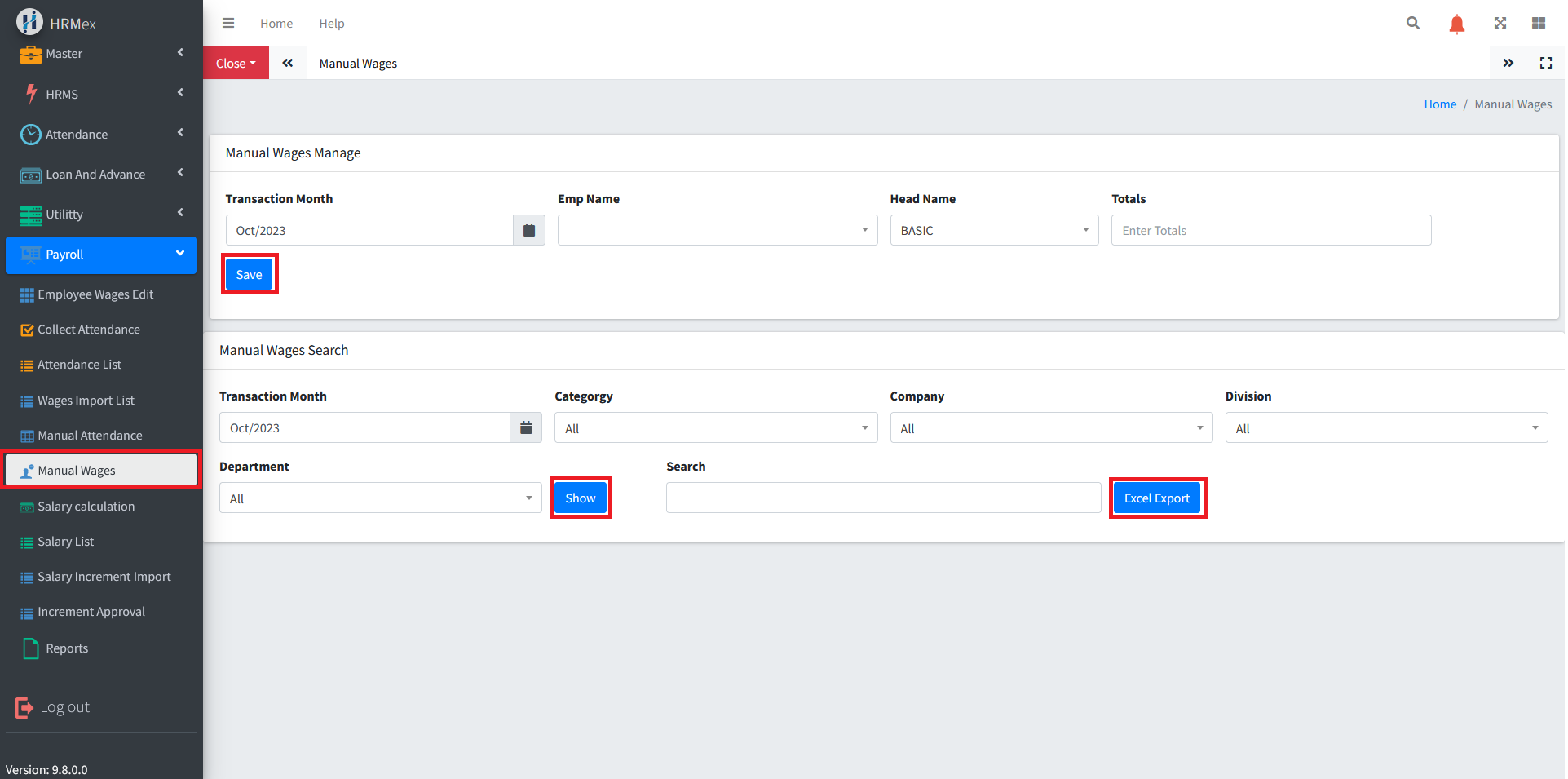
The "Manual Wages" feature in HRMex Time and Attendance software, accessible from the Payroll menu, is a vital tool for accurately managing and recording employee wage adjustments. This feature allows users to manually adjust wages, review records, apply filters, search for specific employees, and export data for record-keeping or further processing.
Accessing Manual Wages
Log in: Begin by logging into the HRMex Time and Attendance software using your credentials.
Navigate to Payroll Menu: In the main menu, click on the "Payroll Menu" option.
Access Manual Wages: Within the Payroll Menu, locate and select the "Manual Wages" option. This opens the Manual Wages interface.
Modifying Employee Wages
The Manual Wages interface provides the tools necessary for adjusting employee wages. Here's how to use this feature:
Select the Transaction Month: Begin by choosing the specific month for which you want to make wage adjustments.
Choose Employee Name: Select the name of the employee for whom you are adjusting wages.
Select Salary Head: Pick the salary head (e.g., 'Basic Salary,' 'Overtime Pay,' 'Bonuses') for the wage adjustment.
Enter Difference: Input the difference in the employee's wage. This can be a positive or negative value, depending on whether you're increasing or decreasing the wage.
Save Changes: After entering the wage adjustment, click the "Save" button to apply the changes. These changes will be saved to the database.
Reviewing Manual Wage Records
To review manual wage adjustment records:
Apply Filters: Within the "Manual Wages" section, apply filters based on the transaction month, employee category, company, division, and department to narrow down the list of employees for review.
Show Wage Records: After applying the filters, click the "Show" button to view manual wage adjustment records for the selected employees.
Searching for Specific Employees
To find a specific employee's wage adjustment:
- Use the Search Bar: The search bar allows you to look up a specific employee by their ID, code, or name.
Exporting Manual Wage Records
To export manual wage adjustment records to an Excel spreadsheet:
- Click "Excel Export": Next to the "Show" button, use the "Excel Export" button to export manual wage adjustment data into an Excel file for record-keeping or further processing.
Benefits of Manual Wages
- Accuracy: Ensure precise wage adjustments by manually entering positive or negative differences.
- Customization: Customize wage adjustments based on the transaction month, employee, and salary head.
- Efficiency: Quickly review and export wage adjustment records when needed.
- Error Prevention: Avoid data entry errors and maintain accurate records.
The "Manual Wages" feature in HRMex Time and Attendance software empowers users to maintain accurate wage adjustment records efficiently and accurately.