
The HRMex Time and Attendance software offers a powerful "Employee Wages Edit" feature in the Payroll menu, enabling users to enter or modify the wages of employees. This feature provides flexibility and ease of use when updating employee compensation details.
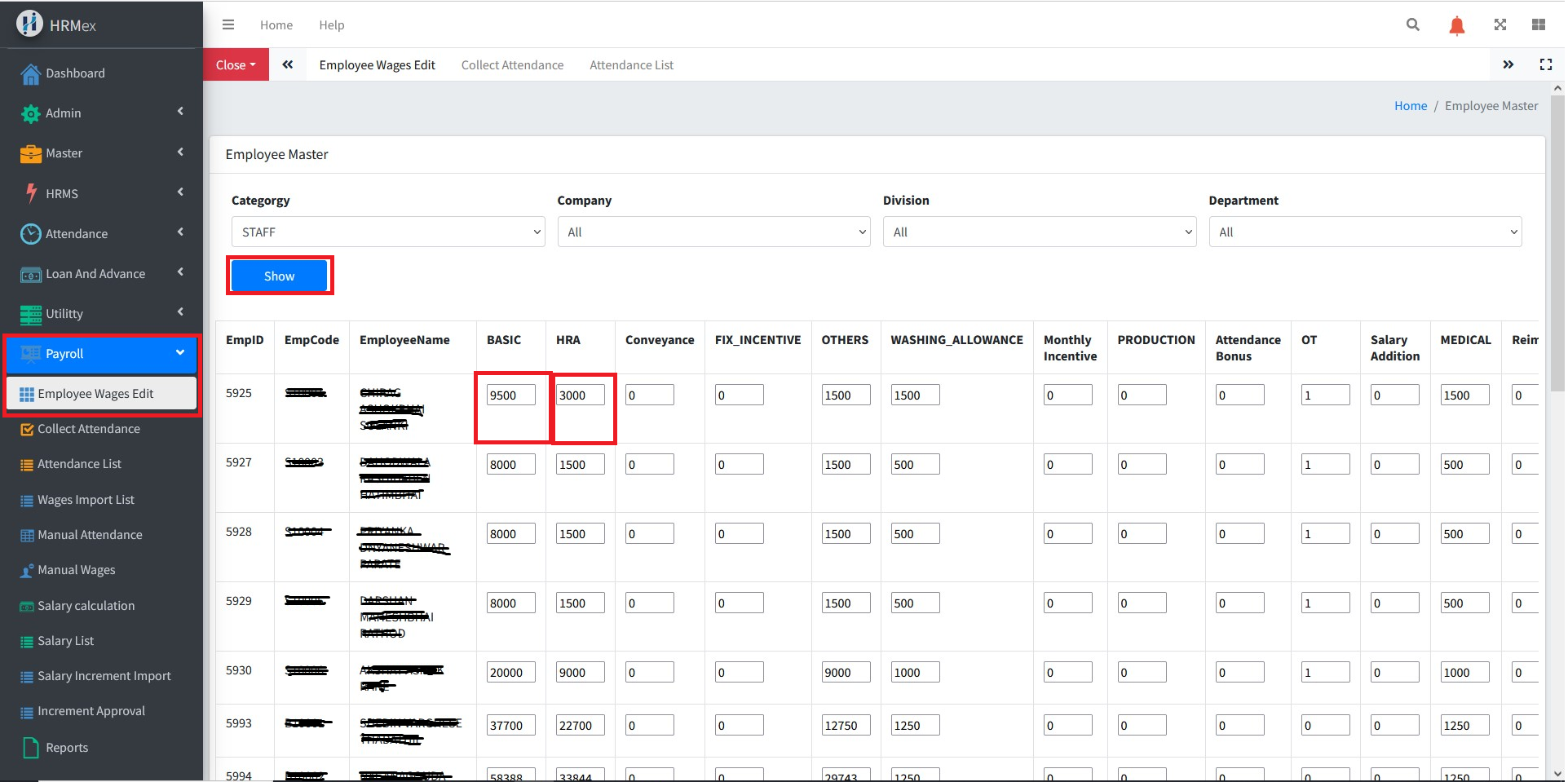
Accessing Employee Wages Edit
Log in: Begin by logging into the HRMex Time and Attendance software with your appropriate credentials.
Navigate to Payroll Menu: In the main menu, click on the "Payroll Menu" option.
Access Employee Wages Edit: Within the Payroll Menu, locate and select the "Employee Wages Edit" option. This will open the Employee Wages Edit interface.
Filtering Employee Wages
The Employee Wages Edit interface provides powerful filtering options, allowing you to narrow down employees based on specific criteria. Here's how to utilize this feature:
Filter by Employee Category: You can choose a specific category of employees whose wages need to be updated.
Filter by Company: Select a company to filter employees associated with that company.
Filter by Division: Choose a division to filter employees within that division.
Filter by Department: Select a department to filter employees within that department.
Click "Show": Once you've set your filters, click the "Show" button to display a list of employees that match your selected criteria.
Editing Employee Wages
Once you click the "Show" button, you'll be presented with a list of employees based on your selected filters. Each employee's information is displayed along with their corresponding salary heads.
To edit an employee's wages:
Locate Employee: Scroll or search for the employee whose wages you wish to update.
Edit Wages: Next to the employee's name and code, you'll find textboxes where you can directly change the wages for each salary head.
Save Changes: After updating the wages, make sure to click the "Save" or "Update" button to save the changes.
Benefits of Employee Wages Edit
- Efficiency: Quickly update multiple employees' wages with minimal effort.
- Accuracy: Ensure that employee wages details are accurate and up-to-date.
- Flexibility: Filter employees based on different criteria to focus on specific groups.
- Compliance: Easily adjust wages to comply with pay scale changes or employee promotions.
By using the "Employee Wages Edit" feature in HRMex Time and Attendance software, you can efficiently manage and maintain accurate employee wages details.