
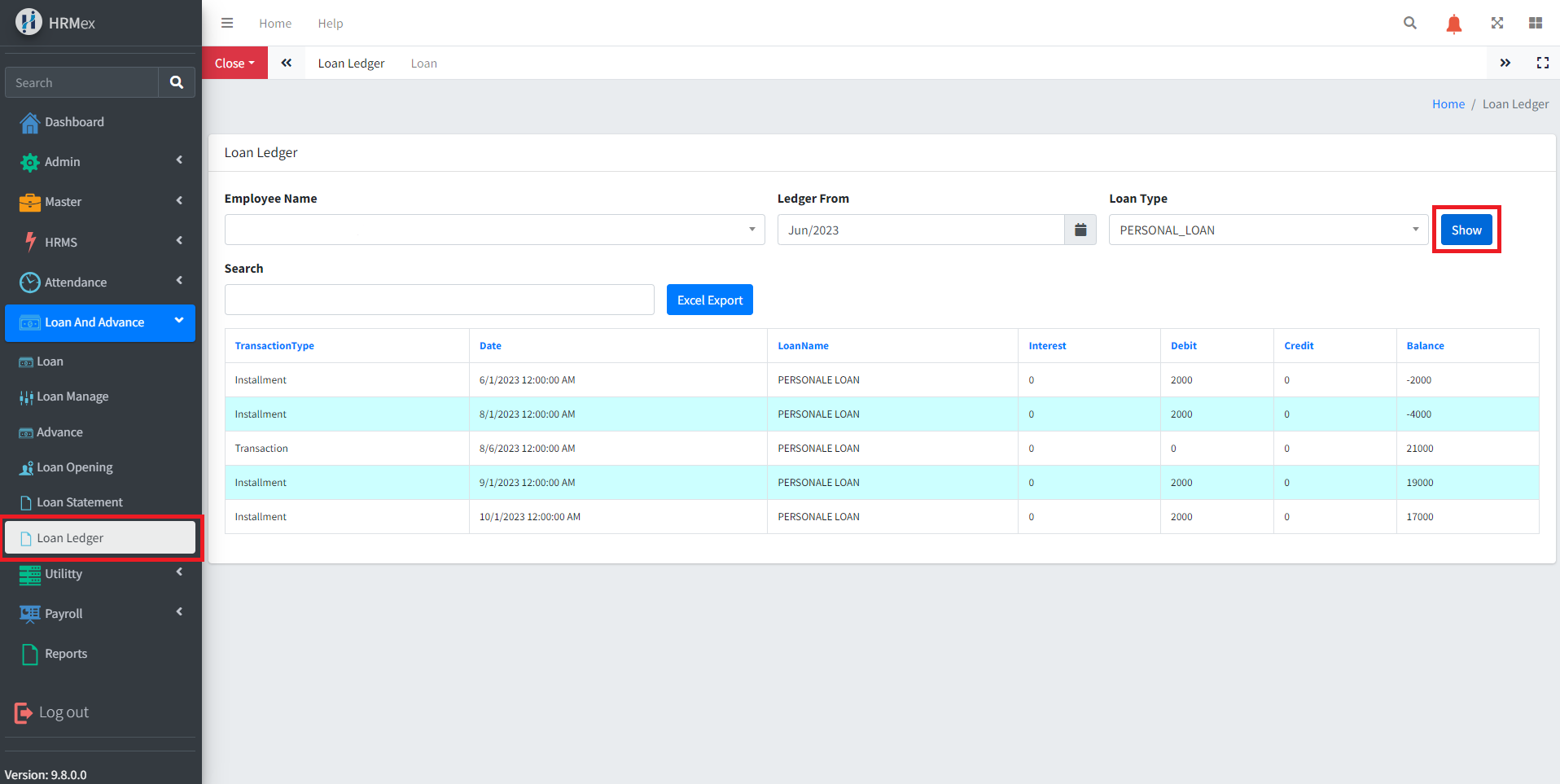
The "Loan Ledger" feature in HRMex Time and Attendance software, accessible from the "Loan and Advance" menu, is a powerful tool for viewing detailed data related to an employee's loan. This feature allows users to select the employee name, choose a starting date for the ledger data, specify the loan type, and then view a comprehensive loan ledger. Additionally, the data can be easily exported to an Excel spreadsheet for further analysis.
Accessing the Loan Ledger
- Log in: Start by logging into the HRMex Time and Attendance software using your credentials.
- Navigate to Loan and Advance Menu: In the main menu, click on the "Loan and Advance" menu option.
- Access the Loan Ledger: Within the Loan and Advance menu, locate and select the "Loan Ledger" option. This opens the Loan Ledger interface.
Viewing Employee Loan Ledger
The Loan Ledger interface provides the tools necessary for viewing a detailed loan ledger for an employee. Here's how to use this feature:
Select Employee Name: Start by choosing the name of the employee for whom you want to view the loan ledger.
Choose Starting Date: Specify the starting date from which the ledger data should be shown.
Select Loan Type: Choose the loan type for which you want to view the ledger data.
Click "Show": After selecting the employee name, date, and loan type, click the "Show" button to display the loan ledger. The ledger includes transaction type of loan, transaction date, loan type, interest, debit, credit, and the balance of the loan for the selected employee in a table format.
Exporting Data
To export the displayed data to an Excel spreadsheet for further analysis:
- Click "Excel Export": Use the "Excel Export" button to export all the presented loan ledger data into an Excel spreadsheet. This facilitates additional analysis and reporting.
Benefits of Loan Ledger
- Efficiency: Quickly access and review a detailed loan ledger for a specific employee, starting from a specified date.
- Customization: Specify the employee, date, and loan type to focus on specific ledger data.
- Data Export: Export loan ledger data for further analysis and reporting.
The "Loan Ledger" feature in HRMex Time and Attendance software streamlines the process of viewing and exporting detailed loan ledger data, enhancing your ability to manage and analyze loan information efficiently.