
The "Device Commands" feature in HRMex Time and Attendance software, accessible from the "Utility" menu, is a powerful tool for performing various commands on registered devices. This feature allows users to view registered devices, execute commands, check the past log of device commands, and manage employee-related commands.
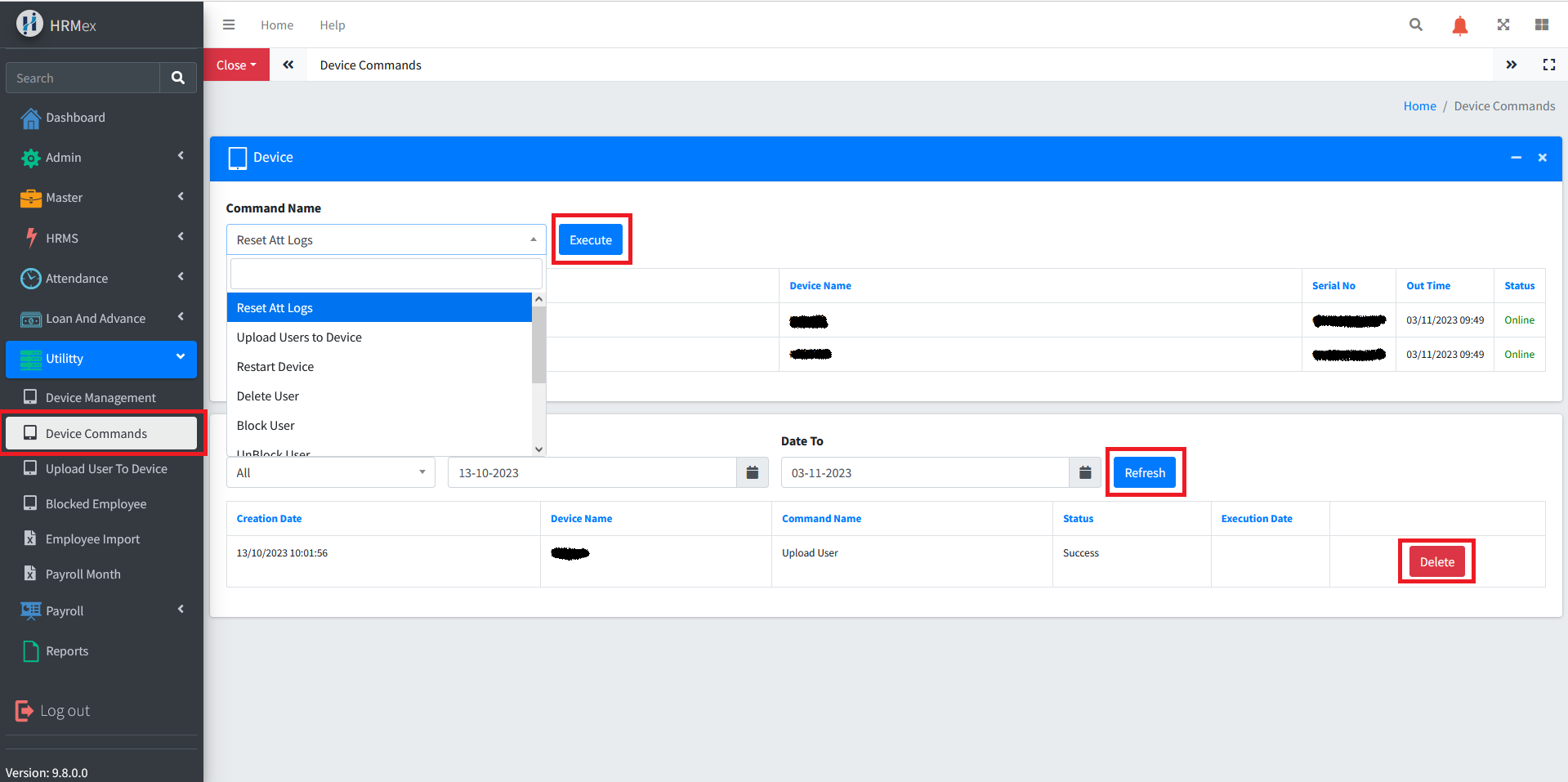
Accessing Device Commands
- Log in: Begin by logging into the HRMex Time and Attendance software using your credentials.
- Navigate to Utility Menu: In the main menu, click on the "Utility" menu option.
- Access Device Commands: Within the Utility menu, locate and select the "Device Commands" option. This opens the Device Commands interface.
Performing Device Commands
The Device Commands interface provides the tools necessary for performing device commands. Here's how to use this feature:
View Registered Devices: Upon accessing the Device Commands, you can view a list of registered devices. This list includes device name, device status, and the available commands.
Select Device and Command: To execute a command, select the device you want to perform the command on. Then, choose the specific command from the list.
Execute Command: Click the "Execute" button. If the selected command is related to employees, you will be prompted to select the employees on which the command should be executed. Confirm the selection and click "Execute."
View Past Command Logs: To check the past log of device commands, select the device and specify the date range for the logs. Click the "Refresh" button to display a list of past command logs. These logs will include the datetime of the command, device name, command name, status, and execution date.
Available Device Commands
The Device Commands feature allows users to perform various commands on devices, including but not limited to:
- Reset attendance logs
- Upload user data to the device
- Restart the device
- Delete, block, or unblock a user
- Clear device logs
- Enroll user face or fingerprint
Benefits of Device Commands
- Efficiency: Easily perform device commands and manage related tasks from one interface.
- Customization: Select the device, command, and employees as required.
- Log Monitoring: Track the history of device commands for reference and auditing purposes.
The "Device Commands" feature in HRMex Time and Attendance software streamlines the process of managing and executing device commands, ensuring efficiency in device management and administration.