
HRMex Time Attendance Software includes an OD (Outdoor Work) Entry feature that allows employees who cannot physically come to the company for biometric attendance or mobile punches to request and record their outdoor work hours. This feature streamlines the process for employees to communicate with the HR department for OD entries. Users can view a list of previously entered OD entries, filter them by employee name, company, or department, and create new OD entries for outdoor work. Each new OD entry can include details such as the employee's name, OD date, OD status (full day or half day), and additional information related to OD or extra work, including overtime (OT).
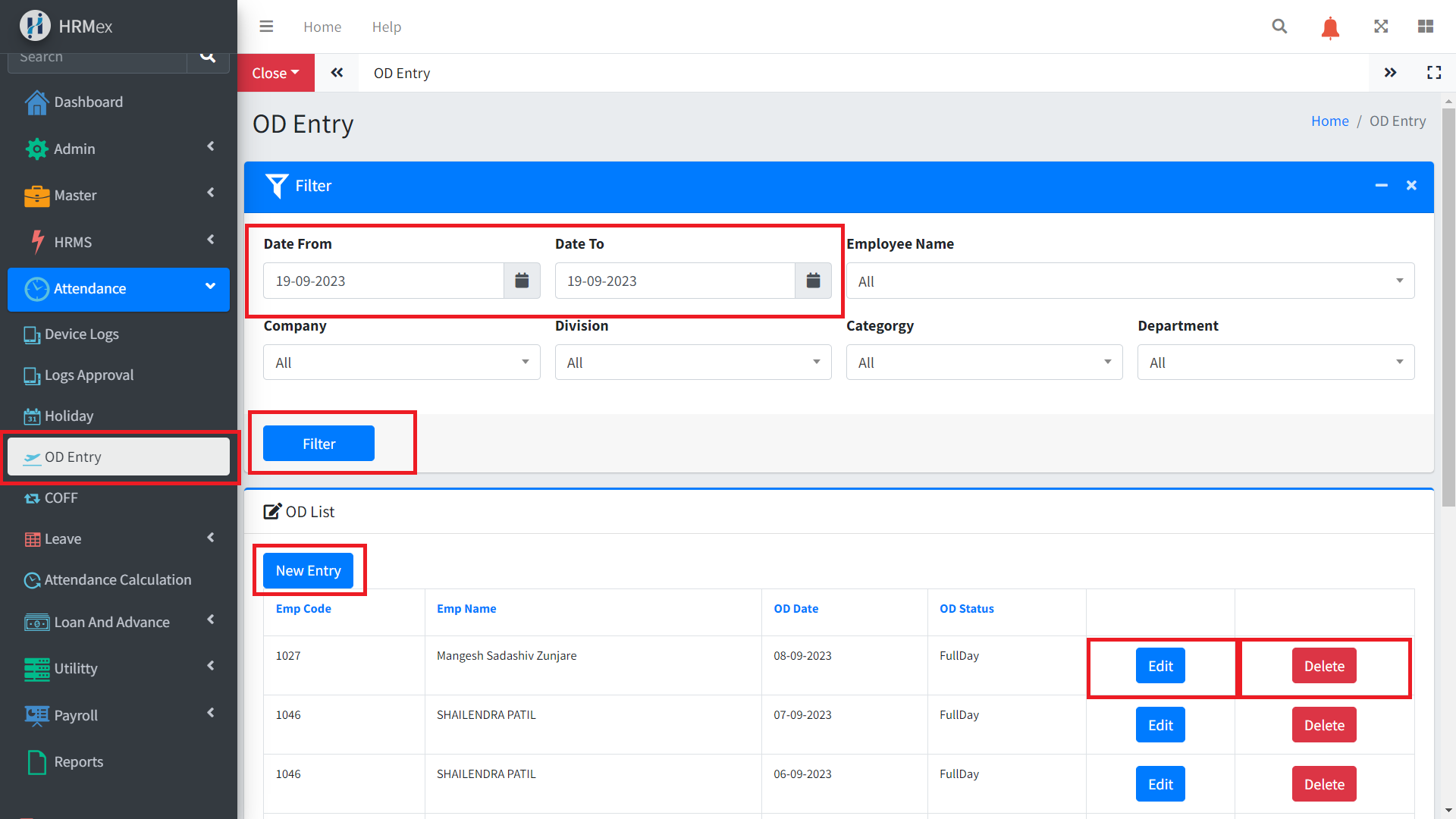
Accessing the OD Entry Section
- Log in to HRMex: Start by logging in to the HRMex Time Attendance Software using your credentials.
- Navigate to OD Entry: Access the OD Entry feature from the Attendance Navigation menu.
Creating a New OD Entry
To create a new OD entry for outdoor work, follow these steps:
Click "New Entry": Locate and click on the "New Entry" button to initiate the OD entry process.
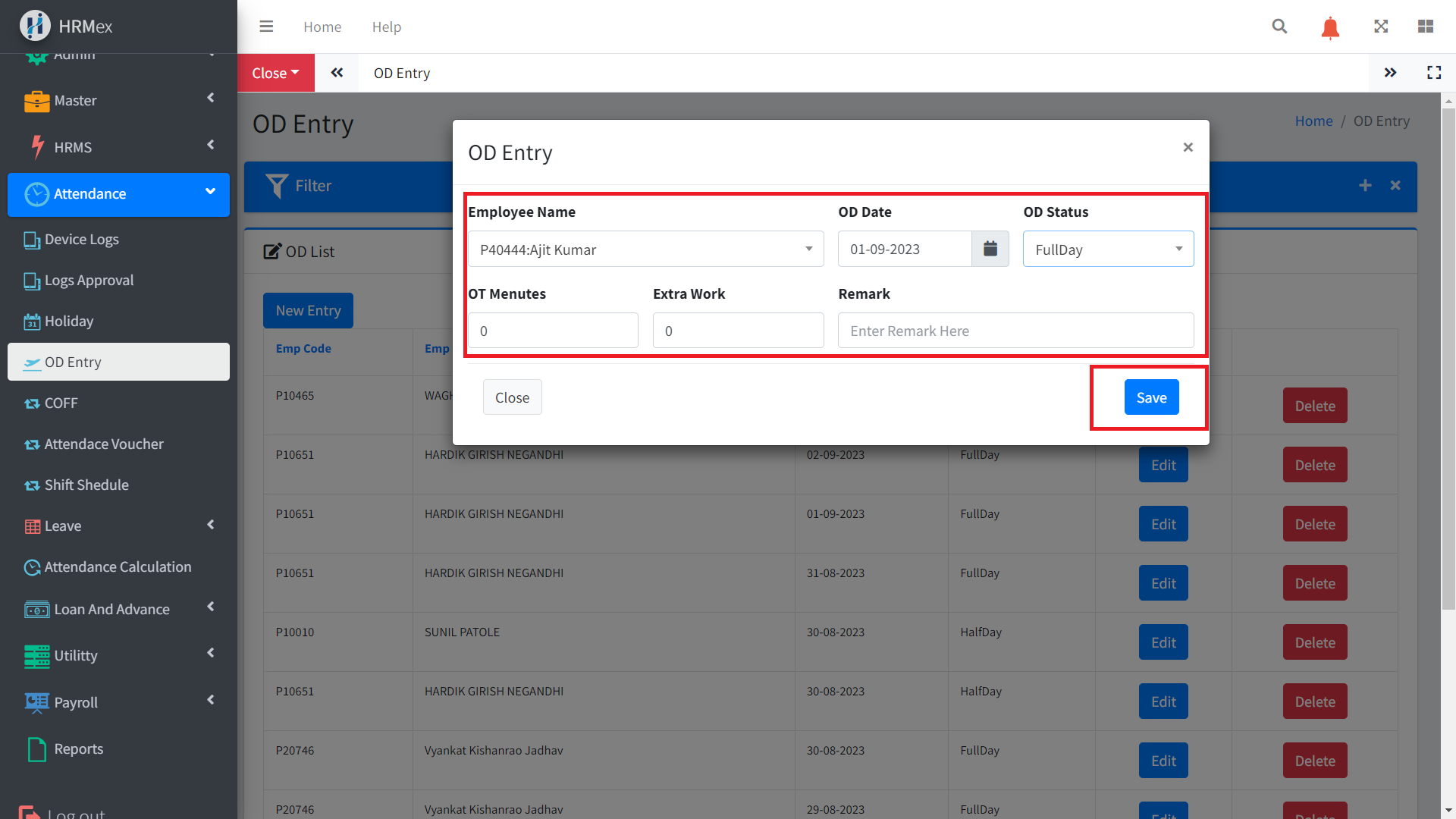
Enter OD Details:
- Select Employee Name: Choose the name of the employee who is requesting the OD entry.
- Select OD Date: Specify the date on which the outdoor work occurred.
- Select OD Status: Indicate whether it was a full day or half day of outdoor work.
- Additional Information: You can add any extra work details, including overtime (OT) or other relevant information.
Save: After entering the required details, click the "Save" button to create the OD entry.
Viewing and Managing OD Entries
In the OD Entry section, you can access and manage a list of previously entered OD entries. Key actions you can perform include:
- Filtering: Use filters to view OD entries by employee name, company, or department, making it easy to find specific records.
- Editing: If necessary, you can edit existing OD entries to update information, such as the OD date or status.
- Deleting: Remove OD entries that are no longer needed or are duplicates.
Benefits of OD Entry Feature
The OD Entry feature in HRMex Time Attendance Software offers several advantages:
- Flexibility: Provides a convenient way for employees to report outdoor work hours when they cannot use the standard attendance methods.
- Record Keeping: Helps maintain accurate records of outdoor work for employees, ensuring proper compensation and tracking.
- Efficiency: Streamlines the communication between employees and the HR department for OD entries, reducing administrative overhead.
- Comprehensive: Allows for the recording of extra work, OT, or other relevant information related to outdoor work.
Conclusion
The OD Entry feature in HRMex Time Attendance Software simplifies the process for employees to report and record outdoor work when they cannot physically come to the company or use mobile punches. With options to filter, edit, and delete entries, it ensures accurate attendance records and efficient communication between employees and HR for OD-related matters.