
The Attendance Voucher feature in HRMex Time Attendance Software provides a user-friendly interface for HR administrators and managers to view and manage employees' attendance data. This feature allows users to access attendance records for a selected month, view detailed attendance for specific employees, and take various actions related to attendance management. You can access the Attendance Voucher section from the Attendance Navigation menu.
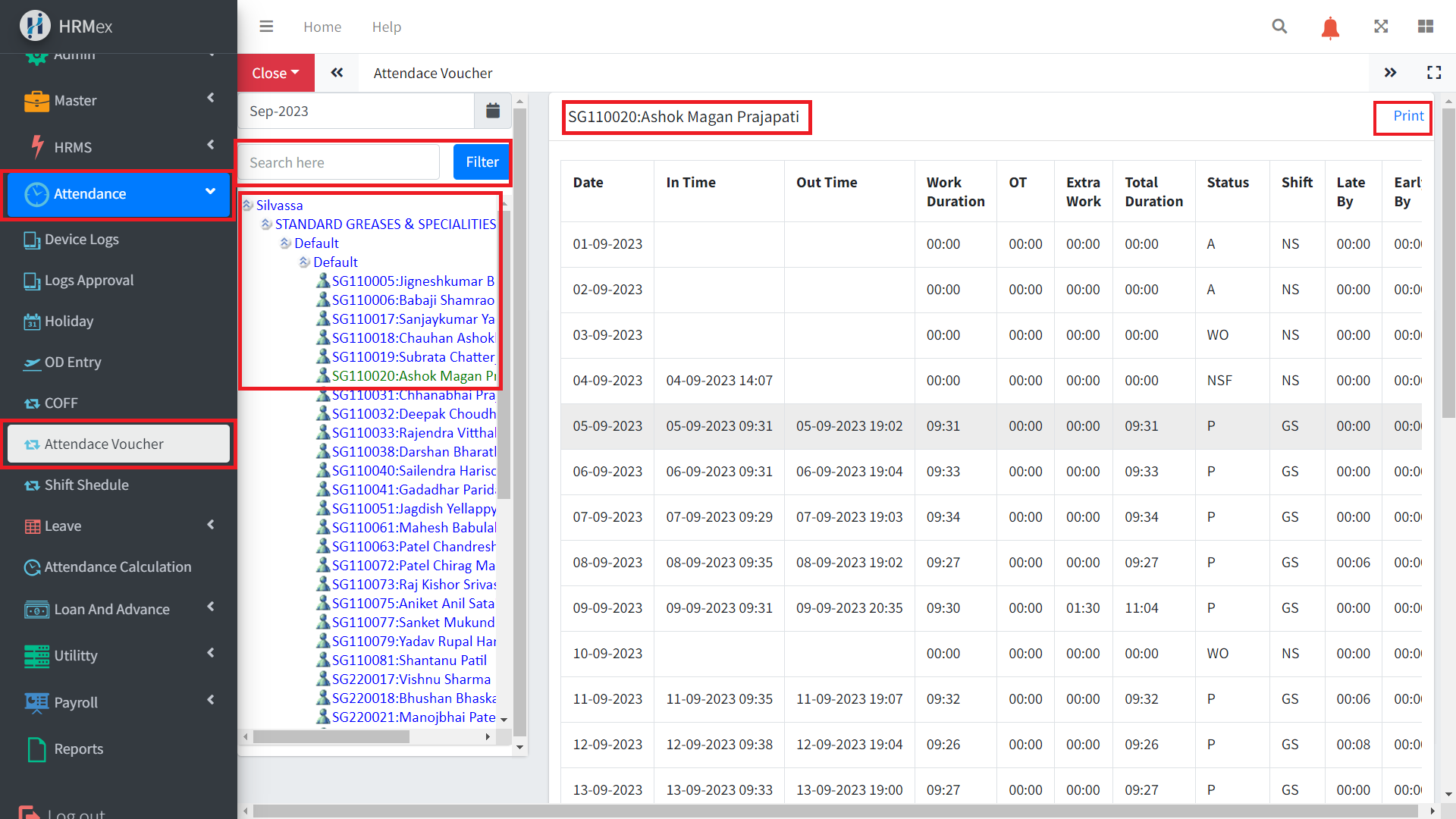
Accessing the Attendance Voucher Section
Log in to HRMex: Begin by logging in to the HRMex Time Attendance Software using your credentials.
Navigate to Attendance Voucher: Access the Attendance Voucher feature from the Attendance Navigation menu.
Selecting Attendance Month and Employee
In the Attendance Voucher section, you can perform the following actions:
Select Attendance Month: Choose the desired month for which you want to view attendance data.
Expand Location Hierarchy: Navigate through the location hierarchy by expanding Location > Company > Unit > Department to access employee data.
Search Employee: Alternatively, you can search for an employee by entering their employee code or name in the search box.
Viewing Full Month Attendance
After selecting the desired employee or location hierarchy, you can view the full month's attendance for the chosen employee. The attendance records typically include:
Date: The date of attendance.(in time, out time)
Shift: The assigned work shift for the day.
Attendance Status: Indicates whether the employee was present, absent, on leave, or had any other attendance status.
Action Column: This column provides options for making changes to the attendance records.
Taking Actions on Attendance
In the Action Column of the Attendance Voucher, you can take various actions related to attendance management for the selected employee:
Clear Missed Punch: Use this option to rectify missed punches for the selected day.
Change Shift: Modify the assigned shift for the day if needed.
Apply Leave: Apply leave for the selected day.
Assign Weekly Off: Designate a weekly off day for the employee.
Cancel Weekly Off: Cancel a previously assigned weekly off day.
OT Sanction: Approve overtime work for the day.
Cancel OT: Cancel previously approved overtime.
COFF Generate: Generate Compensatory Off for eligible days.
Holiday Assign: Assign a holiday for the day.
Holiday Cancel: Cancel a previously assigned holiday.
Benefits of Attendance Voucher
The Attendance Voucher feature in HRMex Time Attendance Software offers several benefits:
Efficiency: Streamlines attendance management by providing a centralized platform to view and take action on attendance records.
Accuracy: Allows HR administrators to correct attendance discrepancies and ensure accurate records.
Customization: Provides flexibility to make changes to shifts, assign leave, manage weekly offs, and handle various attendance-related tasks.
Transparency: Offers transparency in attendance management, ensuring that all changes and actions are documented.
Conclusion
The Attendance Voucher feature in HRMex Time Attendance Software simplifies the process of managing attendance records for employees. It provides a user-friendly interface to view and take action on attendance data, improving efficiency, accuracy, and transparency in attendance management processes. This feature is a valuable tool for HR administrators and managers to maintain accurate attendance records and address attendance-related issues effectively.